

K-Cube® Brushless DC Servo Controller
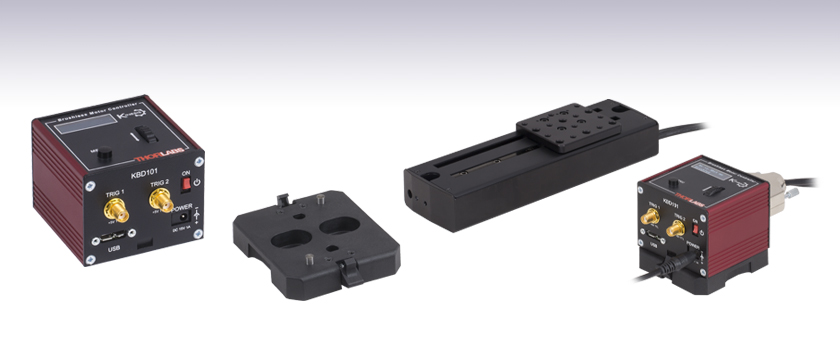
- Drives Brushless DC Servo Motors Up to 2.5 W
- Seamless Operation with Thorlabs' DDS Direct Drive Stages
- Control via Local Panel, SMA Triggers, or USB Computer Connection
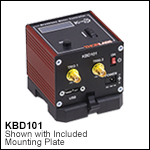
KBD101
Power Supply Sold Separately
Table Mounting Plate
(Included with the KBD101)
Application Idea
A KBD101 Controller can be used
to drive a DDS100 Translation Stage
(sold separately).
OVERVIEW
| K-Cube® Motion Control Modules |
|---|
| Brushed DC Servo Motor Controller |
| Brushless DC Servo Motor Controller |
| Fiber Alignment Controllers |
| Single- and Four-Channel Piezo Inertia Actuator Controller |
| PSD Auto Aligner |
| Single-Channel Piezo Controller and Strain Gauge Reader |
| Solenoid Controller |
| Stepper Motor Controller |
| Voice Coil Motor Controller |
Click to Enlarge
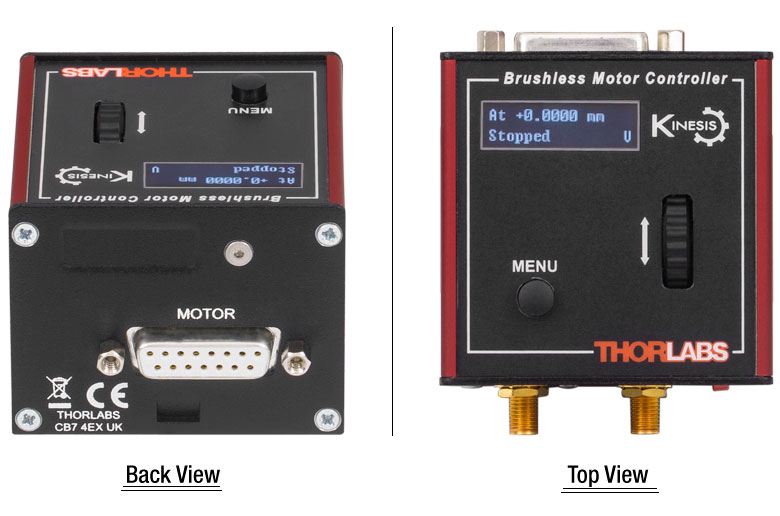
Figure 1.1 Back and Top Views of the KBD101 K-Cube
(See the Pin Diagrams Tab for More Information)
Features
- Compact Footprint: 60.0 mm x 60.0 mm x 49.2 mm
- Differential Encoder Feedback (QEP Inputs) for Closed Loop Positioning
- Auto-Configure Function when Used with the 50 mm and 100 mm Fast Translation Stages
- Easy-to-Use Manual Controls
- Velocity Wheel: Bidirectional Control
- Digital Display Menu: Jogging Functionality with Position Presets
- Two Full Software Suites Available (See Kinesis and XA Software Tab for Details)
- Software Compatible with Other Motion Controllers for Integrated Systems Development
- Single- and Multi-Channel PSU Options Available Separately
- Multi-Axis Expansion Using Ethernet and USB Controller Hubs (Sold Separately)
- Magnetic, Clip-On Optical Table Mounting Adapter Included
The KBD101 K-Cube® Brushless DC Servo Motor Controller is a part of Thorlabs' new and growing line of high-end, compact motion controllers and is ideal for fast (hundreds of mm/s), high-resolution (10 million encoder counts per second) applications. Designed to provide easy manual and automatic control of brushless DC servo motors, this single-channel driver is capable of driving a variety of rotary and linear brushless 3-phase DC motors with up to 2 A peak coil current. The controller has also been optimized for 'out-of-the-box' operation with Thorlabs' brushless DC servo motor equipped stages, such as the DDS050 and DDS100 fast translation stages. When paired with these stages, speeds up to 500 mm/s can be achieved. The highly flexible software settings and closed-loop tuning support operation with a wide range of third-party DC servo motors and associated stages and actuators.
The unit has a highly compact 60.0 mm x 60.0 mm x 49.2 mm footprint, allowing it to be positioned close to the motorized system for added convenience when manually adjusting motor positions using the top panel controls. Tabletop operation also allows minimal drive cable lengths for easier cable management. Each unit contains a front-located power switch that, when turned off, saves all user-adjustable settings. Please note that this switch should always be used to power down the unit. For convenience, a 1.5 m long Type A to Type Micro B USB 3.0 cable is included with the KBD101 cube.
USB connectivity provides easy 'Plug-and-Play' PC-controlled operation with our Kinesis or XA software packages. Both packages feature .NET controls which can be used by third-party developers working in the latest C#, Visual Basic, LabVIEW™, or .NET compatible languages. For more details on our Kinesis and XA software suites, please see the Kinesis and XA Software and Kinesis Tutorials tabs.
Optical Table Mounting Plate
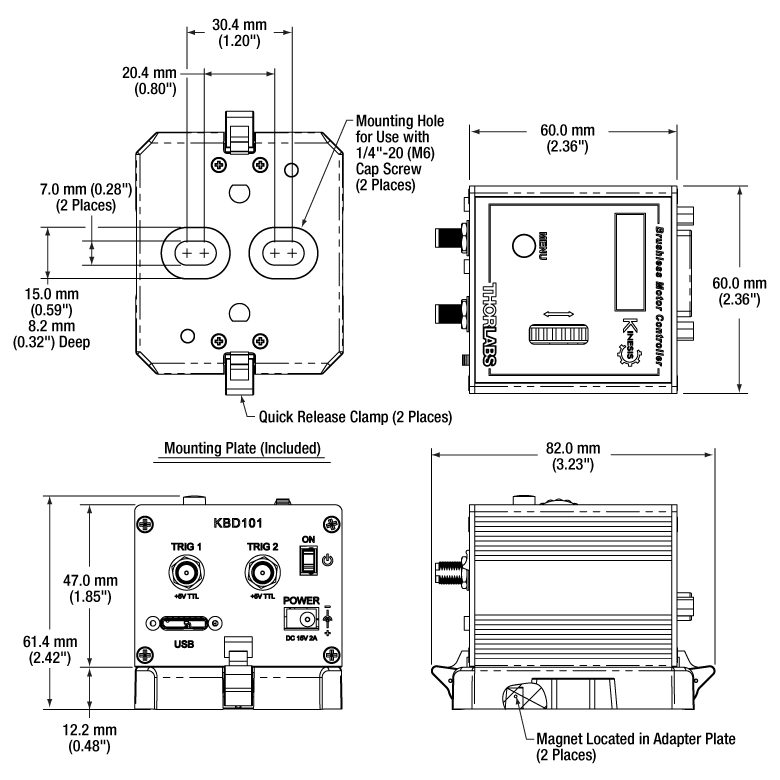
Each unit comes with a mounting plate that clips onto the base of the controller. The plate contains two magnets for temporary placement on an optical table and two counterbores for 1/4"-20 (M6) cap screws for more permanent placement on the tabletop. Please see the Specs tab for details.
Power Supply Options
The preferred power supply (single channel or hub-based) depends on the end user's application and whether you already own compatible power supplies. To that end and in keeping with Thorlabs' green initiative, we do not ship these units bundled with a power supply.
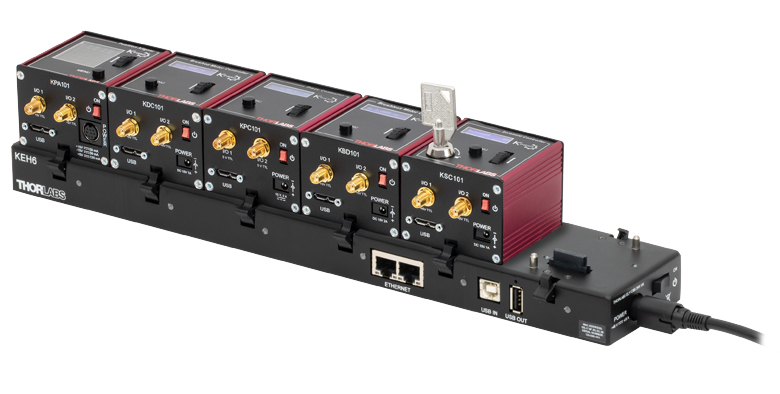
Multiple units can be connected to a single PC by using the KEH3 or KEH6 Ethernet and USB Controller Hubs, available below, for multi-axis motion control applications. The KEH3 allows up to three K-cube controllers to be used, while the KEH6, shown in Figure G1.1, allows up to six K-Cube controllers to be used.
All power supply options compatible with the KBD101 Motor Controller can be found below.
SPECS
| KBD101 Specifications | ||
|---|---|---|
| Motor Output | ||
| Drive Connectora | 15-Pin D-Type, Female (Motor Phase Outputs, Stage ID Input) |
|
| Peak Current Output | 2 A | |
| Pulse Width Modulation Frequency | 40 kHz | |
| Control Algorithm | 16-Bit Digital PID Servo Loop with Velocity and Acceleration Feedforward | |
| Position Feedback | Incremental Encoder | |
| Encoder Bandwidth | 2.5 MHz / 10 MCounts/sec | |
| Position Counter | 32 Bit | |
| Operating Modes | Position and Velocity | |
| Velocity Profile | Trapezoidal/S-Curve | |
| Front Panel Controls | ||
| Sprung Potentiometer Wheel | Bidirectional Velocity Control, Forward/Reverse Jogging, or Position Presets |
|
| Input Power Requirements | ||
| Voltage | 14.5 - 15.5 V Regulated DC | |
| Current | 2 A (Peak) | |
| General | ||
| USB Connector Type | USB 3.0 | |
| USB Connection Speed | USB 1.1 Full Speed (12 Mbps) | |
| Housing Dimensionsa (W x D x H) |
60.0 x 60.0 x 49.2 mm (2.36" x 2.36" x 1.94") |
|
| Compatible Motors | ||
| Type | 3-Phase DC Brushless Motors | |
| Rated Phase Currents (Nominal) | 100 mA to 2 A | |
Click to Enlarge
Figure 2.1 Mechanical Drawing of the KBD101 and Included Optical Table Adapter
PIN DIAGRAMS
Motor Control Connector
D-type Female
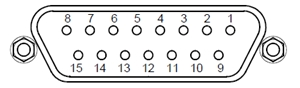
| Pin | Description | Pin | Description |
|---|---|---|---|
| 1 | Quadrature A- | 9 | Ground |
| 2 | Quadrature A+ | 10 | Motor Phase C |
| 3 | Quadrature B+ | 11 | Motor Phase A |
| 4 | Quadrature B- | 12 | Motor Phase B |
| 5 | Encoder Index I- | 13 | +5 V |
| 6 | Encoder Index I+ | 14 | Ground |
| 7 | Negative Limit | 15 | Stage ID |
| 8 | Positive Limit |
Please see Appendix A of the Manual for Further Explanation of these Pin Designations.
TRIG 1SMA Female |
TRIG 2SMA Female |
 |
|
| +5 V TTL | +5 V TTL |
| These connectors provide a 5 V logic level input and output that can be configured to support triggering into and out of external devices. Each port can be independently configured to control the logic level or to set the trigger as an input or output. | |
Computer Connection*
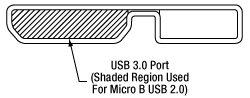
*The USB 3.0 port is compatible with a USB 2.0 Micro B connector if the Micro B connector is plugged into the shaded region in the photo above. A USB 3.0 type A to type Micro B cable is included with the KBD101.
MOUNTING OPTIONS
K-Cube® Mounting Options
Two options are available to securely mount our K-Cube controllers onto an optical table. An optical table mounting plate, provided with every K-Cube, allows for a single controller to be attached to an optical table. Alternatively, three- and six-port Ethernet and USB controller hubs are offered (sold separately) that can mount and power our K-Cube controllers. These options are described in further detail below.
Optical Table Mounting Plate
Each K-Cube unit comes with a mounting plate that clips onto the base of the controller, as shown in Video 815A. The plate contains two magnets for temporary placement on an optical table and two counterbores for 1/4"-20 (M6) cap screws for a more permanent placement on the tabletop.
Kinesis Ethernet and USB Controller Hubs
Multiple units can be mounted and connected to a single PC by using the KEH3 or KEH6 Ethernet and USB Controller Hubs. They consist of two parts: the hub, which can support up to three (Item # KEH3) or six (Item # KEH6) K-Cubes or T-Cubes™, and a power supply that plugs into a standard wall outlet. K-Cubes simply clip into place using the provided on-unit clips, while current- and previous-generation T-Cubes require the KAP101 Adapter Plate, shown in Video 815B. The hubs vastly reduce the number of Ethernet, USB, and power cables required when operating multiple controllers.
K-Cube Table Mounting Plate
Video 815A Unlike T-Cubes, every K-Cube includes a mounting plate that clips onto the base of the controller. The plate contains two magnets for temporary placement on an optical table and two counterbores for 1/4"-20 (M6) cap screws for more permanent placement on the tabletop.
Kinesis Ethernet and USB Controller Hubs
Video 815B The controller hubs allow multiple controllers to be connected to one PC for multi-axis applications. K-Cubes can be directly attached to the hub while T-Cubes require a KAP101 Adapter Plate.KINESIS AND XA SOFTWARE
Software
Kinesis Version 1.14.58
XA Version 1.6.0
The Kinesis and XA Software Packages, which include a GUI for control of Thorlabs' motion controllers.
Also Available:
- Firmware Update Utilities
- Communications Protocol

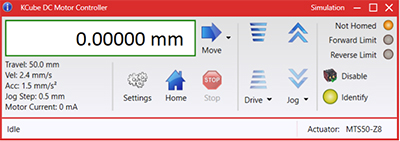
Figure 789A Kinesis GUI Screen
Thorlabs offers two platforms to drive our wide range of motion controllers: our XA software package and our Kinesis software package, which is being phased out. The Kinesis software supports most of Thorlabs' motion control products. The XA software is an improved platform for developers that currently supports some of our most popular motion control products (see the full list of supported products here). The software is undergoing continuous, intensive development and will eventually add support for our entire line of motion control products. The XA software application will be fully supported through the year 2040.
Kinesis Motion Control Software
The Kinesis software features .NET controls which can be used by 3rd party developers working in the latest C#, Visual Basic, LabVIEW™, or any .NET compatible languages to create custom applications. Low-level DLL libraries are included for applications not expected to use the .NET framework. A Central Sequence Manager supports integration and synchronization of all Thorlabs motion control hardware.
By providing a common software platform, Thorlabs has ensured that users can easily mix and match any of the Kinesis controllers in a single application, while only having to learn a single set of software tools. In this way, it is perfectly feasible to combine any of the controllers from single-axis to multi-axis systems and control all from a single, PC-based unified software interface.
Click to Enlarge
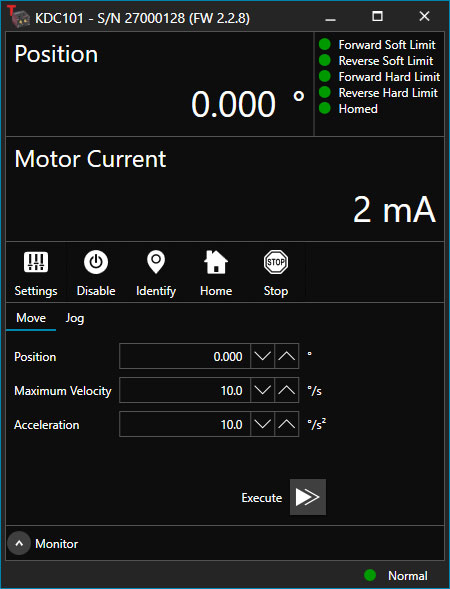
Figure 789B XA GUI for KDC101 Brushed DC Servo Controller
The software package allows two methods of usage: graphical user interface (GUI) utilities for direct interaction with and control of the controllers out of the box, and a set of programming interfaces that allow custom-integrated positioning and alignment solutions to be easily programmed in the development language of choice.
XA Motion Control Software: Improved Platform for Developers
Designed from the ground up to be straightforward to understand, XA provides a thread-safe and language-paradigm-agnostic set of application programming interfaces in C, C++, and C#/.NET with language wrappers available to allow for easy integration into your native, .NET language, Python, or LabVIEW applications. This enables the same functionality as mentioned for the Kinesis software development kit (SDK) while providing a more streamlined toolkit for developers. Coupled with the included developer guides and code examples in the SDK, this software is tailored toward users interested in creating complex, customized applications and interfaces. Full API documentation is provided for the native C library, and the .NET wrapper documentation is currently under development. Please contact Tech Support for more details on using the .NET wrapper.
XA also features a comparable GUI to Kinesis while adding improvements to the user experience, like the ability to save device states and a more consistent interface across devices of different types. In addition, further improvements are planned as XA will be fully supported through the year 2040, whereas the Kinesis software is being phased out. The current version of the XA software can only drive select Thorlabs motion controllers. However, the software is undergoing continuous, intensive development and will eventually add support for our entire line of motion control products. Information on software compatibility can be found in the XA User Guide, and additional details about the software, including a list of compatible devices, can be found here.
KINESIS TUTORIALS
Thorlabs' Kinesis software features new .NET controls which can be used by third-party developers working in the latest C#, Visual Basic, LabVIEW™, or any .NET compatible languages to create custom applications.
C#
This programming language is designed to allow multiple programming paradigms, or languages, to be used, thus allowing for complex problems to be solved in an easy or efficient manner. It encompasses typing, imperative, declarative, functional, generic, object-oriented, and component-oriented programming. By providing functionality with this common software platform, Thorlabs has ensured that users can easily mix and match any of the Kinesis controllers in a single application, while only having to learn a single set of software tools. In this way, it is perfectly feasible to combine any of the controllers from the low-powered, single-axis to the high-powered, multi-axis systems and control all from a single, PC-based unified software interface.
The Kinesis System Software allows two methods of usage: graphical user interface (GUI) utilities for direct interaction and control of the controllers 'out of the box', and a set of programming interfaces that allow custom-integrated positioning and alignment solutions to be easily programmed in the development language of choice.
For a collection of example projects that can be compiled and run to demonstrate the different ways in which developers can build on the Kinesis motion control libraries, click on the links below. Please note that a separate integrated development environment (IDE) (e.g., Microsoft Visual Studio) will be required to execute the Quick Start examples. The C# example projects can be executed using the included .NET controls in the Kinesis software package (see the Kinesis Software tab for details).
 |
Click Here for the Kinesis with C# Quick Start Guide Click Here for C# Example Projects Click Here for Quick Start Device Control Examples |
|
LabVIEW
LabVIEW can be used to communicate with any Kinesis-based controller via .NET controls. In LabVIEW, you build a user interface, known as a front panel, with a set of tools and objects and then add code using graphical representations of functions to control the front panel objects. The LabVIEW tutorial, provided below, provides some information on using the .NET controls to create control GUIs for Kinesis-driven devices within LabVIEW. It includes an overview with basic information about using controllers in LabVIEW and explains the setup procedure that needs to be completed before using a LabVIEW GUI to operate a device.
 |
Click Here to View the LabVIEW Guide Click Here to View the Kinesis with LabVIEW Overview Page |
|
K-Cube® Brushless DC Servo Controller
Click to Enlarge
- Front Panel Velocity Wheel and Digital Display for Controlling Motorized Stages or Actuators
- Two Bidirectional SMA Trigger Ports to Read or Control External Equipment
- Interfaces with Computer Using Included USB Cable
- Fully Compatible with Kinesis and XA Software Packages
- Compact Footprint: 60.0 mm x 60.0 mm x 49.2 mm
- Power Supply Not Included (See Below)
Thorlabs' KBD101 K-Cube® Brushless DC Motor Controller provides local and computerized control of a single motor axis. It features a top-mounted control panel with a velocity wheel that supports four-speed bidirectional control with forward and reverse jogging as well as position presets. The digital display on the top panel includes a backlight that can be dimmed or turned off using the top panel menu options. The front of the unit contains two bidirectional trigger ports that can be used to read a 5 V external logic signal or output a 5 V logic signal to control external equipment. Each port can be independently configured to control the logic level or to set the trigger as an input or output.
The KBD101 controller is fully compatible with our Kinesis and XA software packages, but not all motion control devices are supported by XA at this time. A full list of supported devices can be found here. Please see the Kinesis and XA Software tab for more information.
Please note that this controller does not ship with a power supply. Compatible power supplies are listed below. Additionally, note that the TPS008 eight channel power supply will only be able to power four KBD101 brushless DC servo controllers.
Part Number | Description | Price | Availability |
|---|---|---|---|
KBD101 | K-Cube Brushless DC Servo Driver (Power Supply Not Included) | $965.42 | Today |
Compatible Power Supplies
Click for Details
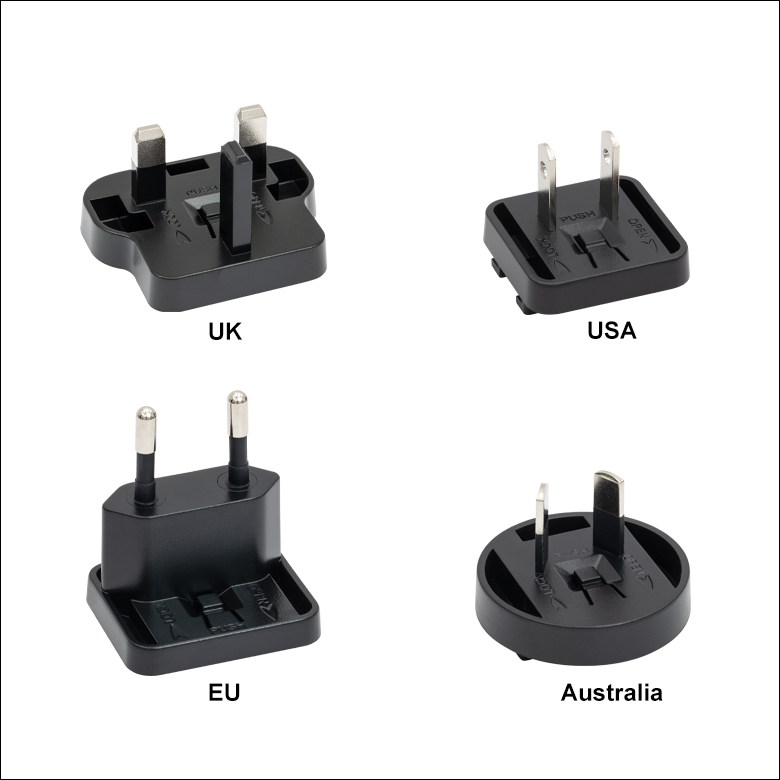
Figure 780B Each KPS201 power supply includes one region-specific adapter, which can be selected upon checkout.
Click to Enlarge
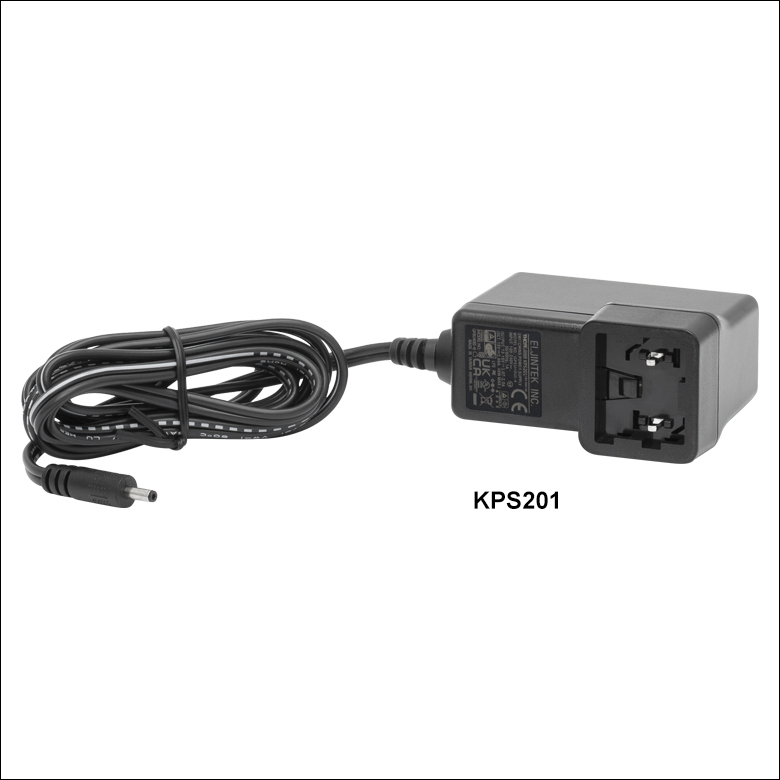
Figure 780A The KPS201 Power Supply Unit
- Individual Power Supply
- KPS201: For K-Cubes® or T-Cubes™ with 3.5 mm Jacks
- Ethernet and USB Controller Hubs Provide Power and Communications
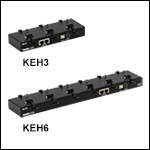
- KEH3: For Up to Three K-Cubes or T-Cubes
- KEH6: For Up to Six K-Cubes or T-Cubes
The KPS201 power supply outputs +15 VDC at up to 2.66 A and can power a single K-Cube or T-Cube with a 3.5 mm jack. It plugs into a standard wall outlet.
The KEH3 and KEH6 Controller Hubs contain a fully compliant USB 2.0 hub circuit and provide all communications and power distribution for up to three (Item # KEH3) or six (Item # KEH6) K-Cubes or T-Cubes (KAP101 or KAP102 adapters are needed for T-Cubes), using only a single power connection. Additionally, the hubs have two Ethernet connection ports. The second Ethernet port or USB OUT port can be connected to the input on another Controller Hub to allow multiple Controller Hub connections while still only requiring a single Ethernet or USB cable from the host PC. The hubs draw a maximum current of 4.6 A; please verify that the cubes being used do not require a total current of more than 4.6 A.
For more information on the controller hubs, see the full web presentation.
Part Number | Description | Price | Availability |
|---|---|---|---|
KPS201 | 15 V, 2.66 A Power Supply Unit with 3.5 mm Jack Connector for One K- or T-Cube | $43.15 | Today |
KEH3 | NEW! Ethernet and USB Controller Hub and Power Supply for Three K-Cubes | $662.50 | Today |
KEH6 | Ethernet and USB Controller Hub and Power Supply for Six K-Cubes | $800.00 | Lead Time |